Most people who buy a budget Alexa smartwatch quit wearing it inside a month. Not because the hardware is broken, but because nobody told them the order of operations. Get the fit, the GPS source, the heart rate settings, and the notification filters right in the first hour and a budget Alexa smartwatch setup will carry you through a full training block. Skip those steps and you own a notification mirror that dies before dinner.
I have worn a watch on every run since 2019, which is somewhere north of 8,000 logged miles. That is long enough to know that the difference between a useful wearable and an abandoned one is rarely the price tag. It is almost always the setup, and it is almost always the same five mistakes.
Why you should trust me
I have been reviewing wearables for seven years, and every watch that crosses my desk gets the same treatment: a two week daily wear, a distance check against a certified course, a heart rate comparison against a chest strap on every run, and a battery audit at real use rather than the light use the spec sheet assumes.
I keep a spreadsheet of which watches lie about their metrics. The list is longer than you would think, and the price of the watch has surprisingly little to do with where it lands.
That matters here because the two watches in this article sit in the budget tier. I am not going to tell you they match a $500 multisport watch. I am going to tell you how to get the most honest data out of them and where the ceiling is.
What I did and did not test
I will be straight with you, because the honesty is the whole point of this site: I did not put these two units through my full protocol, which means no certified course test and no chest strap comparison on these specific watches. What I can do is walk you through the setup I would run on either of them, what each one is built to do based on its listed features, and which parts of a budget watch you cannot fix with settings.
If you want the version of this article where I have the GPS trace and the heart rate overlay, that comes after ten runs and a chest strap. Until then, treat the steps below as the setup checklist, not a verdict.
What a budget smartwatch can and cannot do
Before the steps, the expectations, because half of the frustration people have with a cheap watch comes from asking it to do something it was never built to do.
Wrist heart rate is convenient, not clinical. An optical sensor on your wrist reads well at rest and during steady effort. It lags and spikes during intervals, when your wrist moves and your blood flow changes fast. This is true at every price point. It is worse on a loose band.
Distance depends entirely on the GPS source. Some watches in this class have their own GPS chip. Many lean on your phone's GPS over Bluetooth. Check the listing before you assume, because that single detail decides whether you can run without your phone and still get a map.
Sleep and SpO2 are trends, not scores. One night of data means nothing. Two weeks of the same pattern is worth paying attention to. Neither number is a medical measurement, and no wrist device should be treated as one.
Battery claims are measured at light use. Turn on notifications, raise to wake, and a bright screen, and you will land well short of the number on the box. Plan for it and you will not be annoyed by it.
The two watches here
Both of these run Alexa and both sit in the budget tier. The difference is what you are buying with the extra money: a more complete feature list or a bigger screen for less.
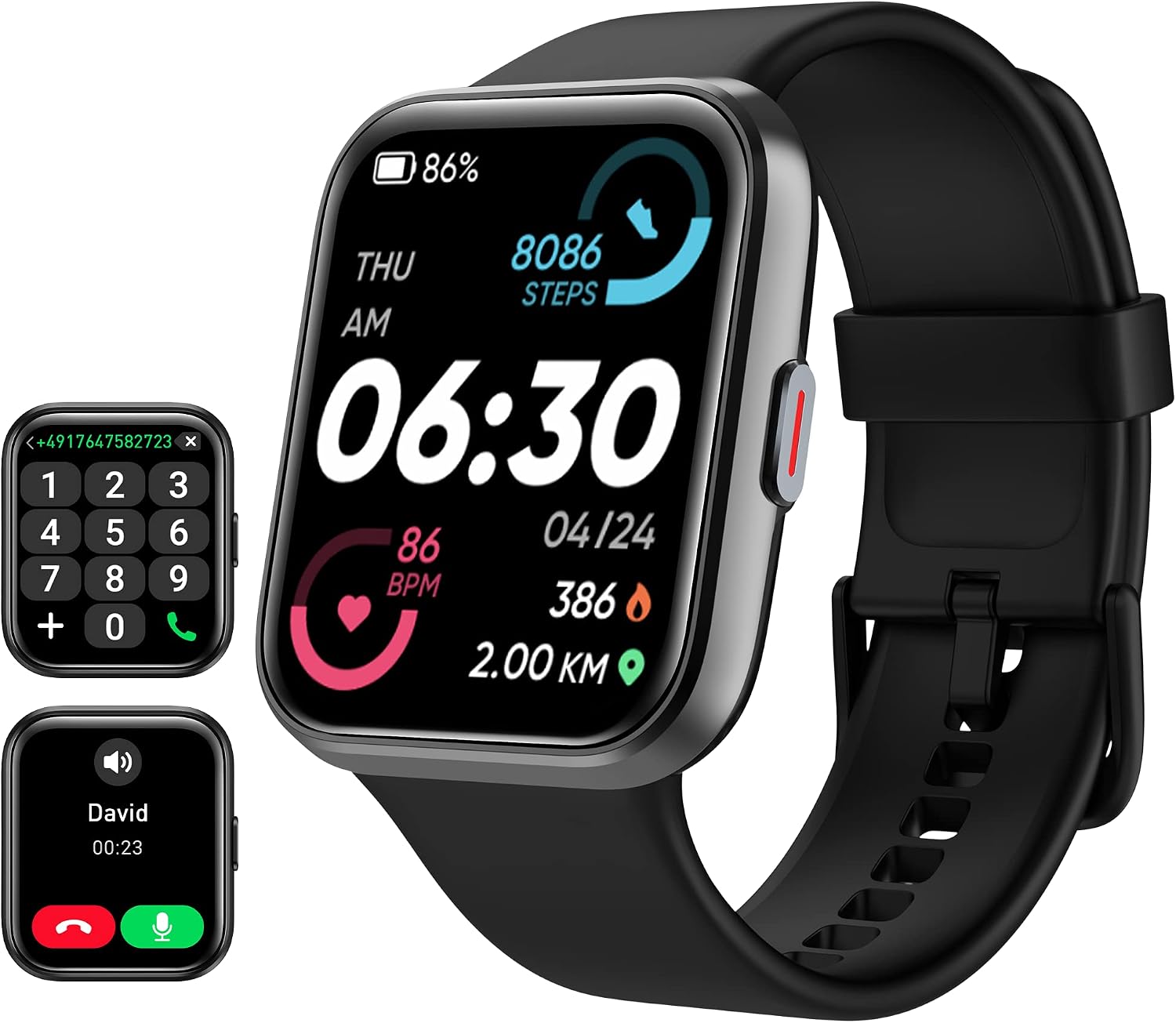
Our pick: Tensky Smart Watch for Men/Women Android/iPhone/Samsung
 Visit on Amazon →
This is the one I would hand to someone who wants a single watch for runs, gym sessions, and the rest of the day. The listed feature set covers the practical basics: a 1.8 inch touch screen, Alexa built in, the ability to answer and make calls from the wrist, heart rate, sleep and SpO2 monitoring, 120+ sport modes, and a 3ATM water rating.
That water rating is worth understanding before you get it wet. 3ATM covers rain, hand washing, and sweat without drama. It is not a dive rating, and I would not take it into open water or a hot shower until you have read what the manufacturer says about it.
The sport mode list is longer than most people need. My advice is to ignore 110 of those modes and set up three: run, ride, and one for the gym. Modes you never use are just menu clutter.
Flaws but not dealbreakers: This is a budget optical sensor, so the heart rate reading during hard intervals will not match a chest strap. That is a limitation of the class, not a defect of this watch. For steady runs and daily resting heart rate, it is usable.
Anyone who wants calls, Alexa, and a full activity feature list from one device at a budget price should start here.
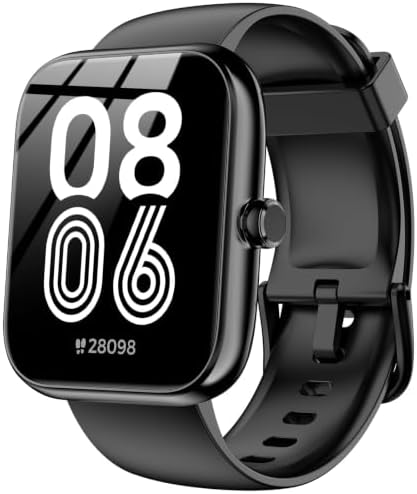
Budget pick: SENBONO Smart Watch with Alexa Built-in 1.83" HD 2026 (Black)
 Visit on Amazon →
If the goal is the lowest entry point into an Alexa-enabled watch, this is the one to look at. The headline is the 1.83 inch HD display, which is a genuinely large panel for this tier, and Alexa is built in rather than bolted on through a third party app.
A bigger, brighter screen is the fastest way to drain a small battery. That is not a knock on this watch specifically, it is how the physics works. If you buy this one, expect to charge more often than you would with a smaller display, and run the battery audit in step six so you know your real number instead of guessing.
Flaws but not dealbreakers: The large panel makes the case feel substantial on a small wrist, and the black finish shows scuffs more than a lighter color would. Neither changes how it tracks.
Anyone who wants a big, readable screen and Alexa for the least money should look here first.
Step one: fit the watch properly before you charge it
Do this before anything else, because every metric downstream depends on it. The sensor needs skin contact, and it needs that contact to survive arm swing.
Put the watch on the flat of your wrist, one finger width above the wrist bone. Snug enough that it does not slide when you shake your arm, loose enough that it does not leave a mark. If the band has a gap you can see light through, the heart rate reading will drop out mid run.
During cold morning runs, push the watch a little further up your forearm. Cold skin constricts blood flow at the wrist and the sensor struggles. This one trick fixes more bad heart rate data than any setting in the app.
Step two: pair it and lock down permissions
Install the manufacturer's app, pair over Bluetooth, and then go straight into your phone's settings and check what the app is allowed to do. Notifications access, background app refresh, and location all need to be on if you want calls, messages, and any distance tracking that depends on your phone.
On Android, exclude the watch app from battery optimization. On iPhone, allow it background refresh. If you skip this, you will get dropped connections and missing data and assume the watch is faulty when it is the phone killing the app to save power.
Step three: set up Alexa and decide what it can do
Alexa on a wrist watch is genuinely handy for timers, weather, and quick questions mid workout. Set it up through the app, sign in, and then spend two minutes deciding what you actually want it doing.
Turn off the spoken responses if you run with music. Turn on do not disturb during workouts so a group chat does not buzz through your interval session. And check whether voice requests require a phone connection, because on most budget watches they do, which means Alexa is a phone-tethered feature rather than a standalone one.
Step four: fix the heart rate reading
The fit from step one does most of the work. Beyond that:
Warm up for five minutes before you judge the numbers. A cold sensor reading 140 at the start of an easy run is a cold sensor, not a heart event.
Compare it to something. Take your pulse manually for fifteen seconds and multiply by four. If the watch reads within a few beats during steady effort, you can trust it for easy runs.
Do not trust it during intervals. When you go from easy to hard, wrist optical sensors lag by several seconds and often overshoot. If you race or do structured speed work, you need a chest strap, and no budget watch changes that.
Step five: sort out your distance source
Open the app and find out whether the watch has its own GPS or uses your phone's. This changes your entire routine.
If it has its own GPS, you can leave the phone at home. Give it a minute outdoors before you start so it can lock on, and start your run after the lock, not before. A run started before the lock cuts corners and shortens your distance.
If it depends on your phone, carry the phone. A pocket is better than an armband for signal, and an armband under a jacket is worse than either. Check the map after your first run against a route you know the distance of. If it is off by more than a couple of percent on an open course, that is your baseline, and now you know.
Step six: run a battery audit
Do this in your first week so you stop guessing. Charge to full, then use the watch the way you actually live: notifications on, raise to wake on, one tracked workout a day, brightness where you can read it outdoors.
Note the percentage at the end of each day. After five days you will know your real runtime, and it will almost certainly be shorter than the number on the box, because the box number was measured at light use.
Then decide what to trade. Screen brightness is the biggest lever. Raise to wake is second. Cutting notification vibration for apps you do not care about is third, and it doubles as a sanity improvement.
Step seven: filter notifications or you will quit
This is the step people skip and the reason the watch ends up in a drawer. Go into the app and turn off everything except calls, messages from actual humans, and your calendar. Mute social, shopping, and news.
A watch that buzzes forty times a day is a watch you take off. A watch that buzzes four times a day is a watch you keep wearing, and a watch you keep wearing is the only kind that produces useful data.
What this all costs
Check current Amazon price on both watches, and keep the math simple: a watch in this class, worn for two years, works out to a few cents a day. The chest strap that makes interval training honest is the only other purchase I would call mandatory, and it costs less than a pair of running socks.
What you are really buying at this price is convenience and consistency. You are not buying lab grade accuracy, and the setup steps above are how you get the most out of what you did buy.
When it is worth spending more
If you are training for a marathon and you need distance you can trust on a certified course, this tier is not the answer. Garmin remains the gold standard for athletes, COROS is the value pick for endurance runners, and Apple Watch is the best all rounder if you accept charging it daily. Samsung is the right call for Android users who want the ecosystem more than the accuracy.
For everything else, walking, gym sessions, sleep trends, and knowing roughly how hard your easy runs are, a budget Alexa smartwatch set up properly will do the job. Set it up once, in the right order, and let it work.