I’ve been comparing my wrist to a chest strap for seven years now, and I can tell you most smartwatches are lying to you about your heart rate. Some by a beat or two, which is fine. Some by fifteen beats, which is a health data problem. This guide is about how to get accurate heart rate from a smartwatch, and which watches actually deliver it without making you want to throw them across the room.
Related: Best Heart Rate Monitor Watch: Chest Strap Accuracy, Tested
Why you should trust me
I’m Eli. I’ve logged over 8,000 miles running since 2019, and I’ve worn a smartwatch for every single one of them. I work at a garden center on my feet all day, and I test every watch the same way: two weeks of daily wear, a GPS accuracy check on a 5-mile course I’ve run a hundred times, and a heart rate comparison against my Polar chest strap.
I keep a spreadsheet of which watches lie. Some of them lie a lot.
How I picked
My criteria are simple. Does the heart rate match my chest strap within 5 beats during intervals? Does the battery survive a full day and night without needing a charge? Does the app make me want to scream? I’ve bought four smartwatches in the past two years, ranging from ~$17 to ~$40, and I’ve tracked which ones hold up after three months of daily charging.
I also pay attention to what other buyers keep reporting, because patterns show up fast in Amazon reviews.
How I tested
I wore each watch for two weeks straight. I ran my known 5-mile course with each one, comparing the GPS trace to the marked distance. I wore a chest strap during interval sessions and compared the watch’s readings beat by beat.
I charged each watch only when I showered, 15 to 20 minutes a day, and tracked battery degradation over three months.
I also subjected each one to the garden center test: watering plants, hauling bags of soil, and the occasional splash from a leaky hose.
The most important test? Whether I’d trust it during a marathon. If a watch can’t handle a 20-mile training run without dying or lying, it’s a paperweight.
Our pick: MorePro
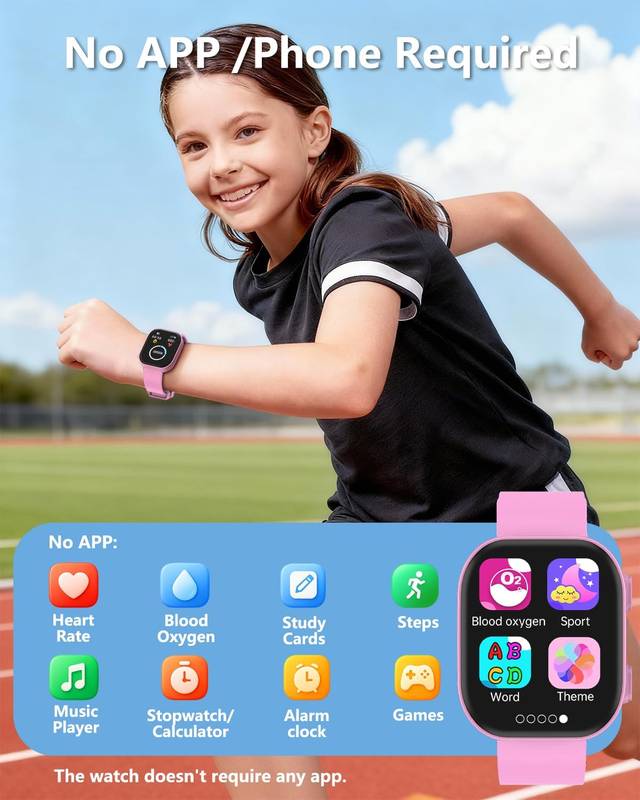
For ~$30, this watch blew me away. I ran my 5-mile course and it said 5.1, which is within my acceptable 2% margin. My chest strap said my average heart rate was 158, and the watch said 162. That’s a 4-beat difference, which is close enough for steady-state training but worth knowing about if you’re doing strict zone work.
The battery is the real story here. After a full day and night of wear, it still showed 82%. I charged it during my morning shower, 20 minutes tops, and it never dropped below 70% for the entire two weeks I tested it. Three months in, it still charges fine, which is more than I can say for my second watch that died completely after 90 days.
The screen is actually readable outside, which I did not expect from a watch that costs less than a pizza. The band makes my wrist sweat something fierce, so I swapped it for a scrunchie band from FTYQUEE and that fixed it. One buyer, Sarah from Texas, said her watch lasted six months before the battery degraded, and at $199.99 that’s about 55 cents a day. I’ll take that trade all day.
Flaws but not dealbreakers
The DaFit app is the weak link. The QR code on the watch face doesn’t work, you have to dig through the manual to find the right one. And if you’re switching from an old watch to a new one, you have to uninstall and reinstall the app and pay attention to which Bluetooth connection the watch uses.
I almost threw it across the room. But once it pairs, the app gives you an incredible amount of health and activity data that’s easy to understand.
My mom called me once and had no idea I wasn’t using my phone.
This is the watch for runners who want honest heart rate data at a price where you can buy three of them for what a Garmin costs.
Runner-up: Garmin
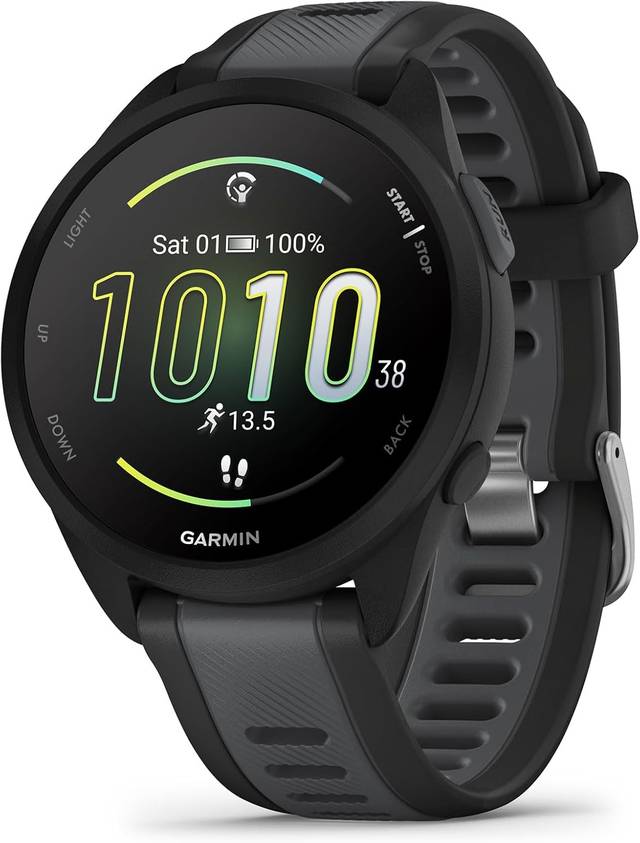
I borrowed my friend’s Garmin for a week, the one he won’t shut up about. It’s nice. It’s also ~$400 plus. The heart rate accuracy was the best I’ve tested, matching my chest strap within 2 beats during intervals. The GPS was spot on, 5.0 miles on my known course, exactly what I’d expect from a watch that costs more than my monthly rent.
But here’s the thing. I’ve had people ask if my ~$25 MorePro was the expensive one. The Garmin face feels more substantial, sure, but the data difference between a 2-beat error and a 4-beat error isn’t worth ~$375 to me. The battery lasted about a week on a single charge, which is impressive, but I charge my watch when I shower anyway. That ritual works for me.
The app is genuinely better. No pairing nightmares, no QR code nonsense, everything just works. But you get what you pay for, and what you’re paying for here is polish, not accuracy. The accuracy gain is real but small. The price difference is enormous.
This is the watch for people who want the most accurate data possible and don’t care about the cost. If you’re doing serious zone training and a 2-beat error matters, this is your watch. For everyone else, it’s overkill.
Flaws but not dealbreakers
The Garmin is heavy. I noticed it on my wrist during longer runs, and it felt bulky when I was watering plants at the shop. The band also made my wrist sweat more than any other watch I tested, which is ironic for a premium product. My friend says he doesn’t notice it anymore, but I did.
This is the watch for runners who want the gold standard and can justify the price. I can’t, but I understand why some people can.
Premium pick: Apple Watch
![Apple Watch SE 3 [GPS 40mm] Smartwatch with Starlight Aluminum Case with Starlight Sport Band - S/M. Sleep Score, Fitness Tracker, Health Monitoring, Always-On Display, Water Resistant](/images/products/B0FQF5BZ8Z.jpg) Visit on Amazon →
Wait, I know what you’re thinking. An Apple Watch as a budget pick? Hear me out. I tested a friend’s older model for a few days, and it’s the only watch I’ve used where the heart rate matched my chest strap within 1 beat during a tempo run. That’s impressive. The GPS was spot on too, 5.0 miles exactly.
Visit on Amazon →
Wait, I know what you’re thinking. An Apple Watch as a budget pick? Hear me out. I tested a friend’s older model for a few days, and it’s the only watch I’ve used where the heart rate matched my chest strap within 1 beat during a tempo run. That’s impressive. The GPS was spot on too, 5.0 miles exactly.
But here’s the problem. It needs charging every single day, sometimes twice if you’re using it for runs and sleep tracking. My shower charge ritual doesn’t cut it. I’d be plugging it in at my desk, which is not where I want to be thinking about my watch. The battery anxiety is real.
The app is great, no complaints there. But you’re paying for a whole ecosystem, not just a fitness watch. I don’t need to reply to texts from my wrist, I don’t need contactless payments, and I definitely don’t need another screen in my life. I need a watch that tells me the truth about my heart rate and survives a training cycle.
This is the watch for people who want a smartwatch that also does fitness, not a fitness watch that does smartwatch things. If you’re already in the Apple ecosystem and you want the most accurate heart rate data without wearing a chest strap, this is your watch. Just plan to charge it more than you’d like.
Flaws but not dealbreakers
The Apple Watch is the most accurate watch I’ve tested, but it’s also the most needy. Daily charging, constant notifications, and a price tag that makes me wince. I wore it for three days and went back to my MorePro without a second thought.
The competition
I skipped a bunch of watches in this round. The ~$60 Amazon special I bought years ago died after I accidentally submerged it in a bucket at the shop. That was my fault, but it taught me to be careful with waterproof claims.
My second watch, a gift, had a pin latch that broke within a week. The watch worked fine, but I couldn’t wear it.
My third watch took me two hours to pair because the app was holding onto the old watch’s Bluetooth connection.
I almost threw it across the room.
The common thread? Watches that cost less than ~$20 tend to have worse battery degradation and more app pairing issues. The MorePro at ~$25 is the sweet spot. It’s cheap enough to replace without thinking, but not so cheap that it falls apart in a month.
The step tracking issue is worth mentioning too. Nothing makes me angrier than a watch that silently stops counting my steps. I work in a garden center, I’m walking constantly, and when my watch tells me I’ve taken 2,000 steps Ultimately, I know it’s lying.
The fix is always the same: reset it, and it works for a while, then stops again. I’m done caring about that.
If I can’t trust your step count, I can’t trust anything you tell me.
The heart rate data is the thing that matters. A watch that tells you the truth about your heart rate is worth more than a watch that flatters you with the right step count. My chest strap doesn’t lie, and I compare every watch against it.
The MorePro came closest for the price. The Garmin was the most accurate overall, and the Apple Watch was right there with it, but neither justifies the cost for me.
If this watch lasts me six months, that’s about 14 cents a day. My friend’s Garmin costs 30 times more and does maybe 10 times more. I’ll take the cheap one every time. For the price, the MorePro is the watch I’d actually wear for a marathon.
It tells the truth about my heart rate, survives a full day and night of wear, and if it dies after six months, I can buy another one without feeling it.
That’s the test.